
Amazon S3 storage dashboards for your team's Apple TV office display
Amazon S3 buckets grow quietly until the bill or a missing backup makes them loud. Dance Party reads the daily storage metrics S3 already publishes to CloudWatch, plus the newest file names in a bucket, and turns them into a dashboard on an office display through an Apple TV. The data and platform team sees growth, tier mix, and whether the nightly export arrived, without opening the console.
- Read-only
- API key connection
- One connection per workspace
Amazon S3 dashboard examples
What teams running Amazon S3 put on the screen, and what you would ask DJ Agent to get it.
Storage class mix
For platform engineering and whoever owns the AWS bill
Lifecycle rules only save money if data actually moves to colder tiers. Bytes per S3 storage class, side by side, show whether Standard is still carrying data that should be in Glacier.
- Bytes stored in each storage class, from CloudWatch daily metrics
- Total bytes across all classes
- Share of the bucket still in S3 Standard
Ask DJ Agent“Show bytes stored per storage class for our prod-data-lake S3 bucket as columns, with the total across classes as the headline.”
Did last night's export land?
For data engineers and on-call
A nightly dump or backup that silently fails is found days later. The newest object keys under the export prefix, with their times and sizes, make a missing or tiny file obvious at the morning stand-up.
- Newest object keys under a prefix such as exports/nightly/
- Last-modified time and size of each file
- Storage class of each file
Ask DJ Agent“List the newest files in our S3 bucket under exports/nightly/ with last-modified time and size, and turn a row red if it is under 1 GB.”
Bucket inventory wall
For infrastructure and DevOps teams
Most AWS accounts collect buckets faster than anyone tracks them. A tile per bucket with its daily size and object count shows at a glance which one is the heavy one this month.
- Buckets the access key can list
- Object count per bucket, from CloudWatch daily metrics
- Standard storage bytes per bucket
Ask DJ Agent“Show a tile for each of our main S3 buckets with yesterday's object count and Standard storage size, amber when a bucket passes 10 TB.”
What Dance Party reads from Amazon S3
Dance Party signs its own requests to S3 and CloudWatch with the access key you provide. It lists buckets and object keys and reads daily storage metrics. It never downloads an object, and it never writes.
Buckets
Amazon S3 API docs ↗- Bucket listEvery bucket the key may list, with its creation date. Needs s3:ListAllMyBuckets.
- Bucket RegionThe Region S3 reports for a bucket.
Daily storage metrics
Amazon S3 API docs ↗- Object countNumberOfObjects for the whole bucket, published once a day.
- Bytes by storage classBucketSizeBytes for Standard, Standard-IA, One Zone-IA, the Intelligent-Tiering tiers, Glacier, and Deep Archive.
Objects
Amazon S3 API docs ↗- Newest filesKey, last-modified time, size, and storage class, from the first 1,000 keys in the bucket or under a prefix.
How to connect Amazon S3
Before you start
- An owner or admin of your Dance Party workspace makes the Amazon S3 connection.
- Permission in AWS IAM to create a user, attach a policy, and create an access key for it
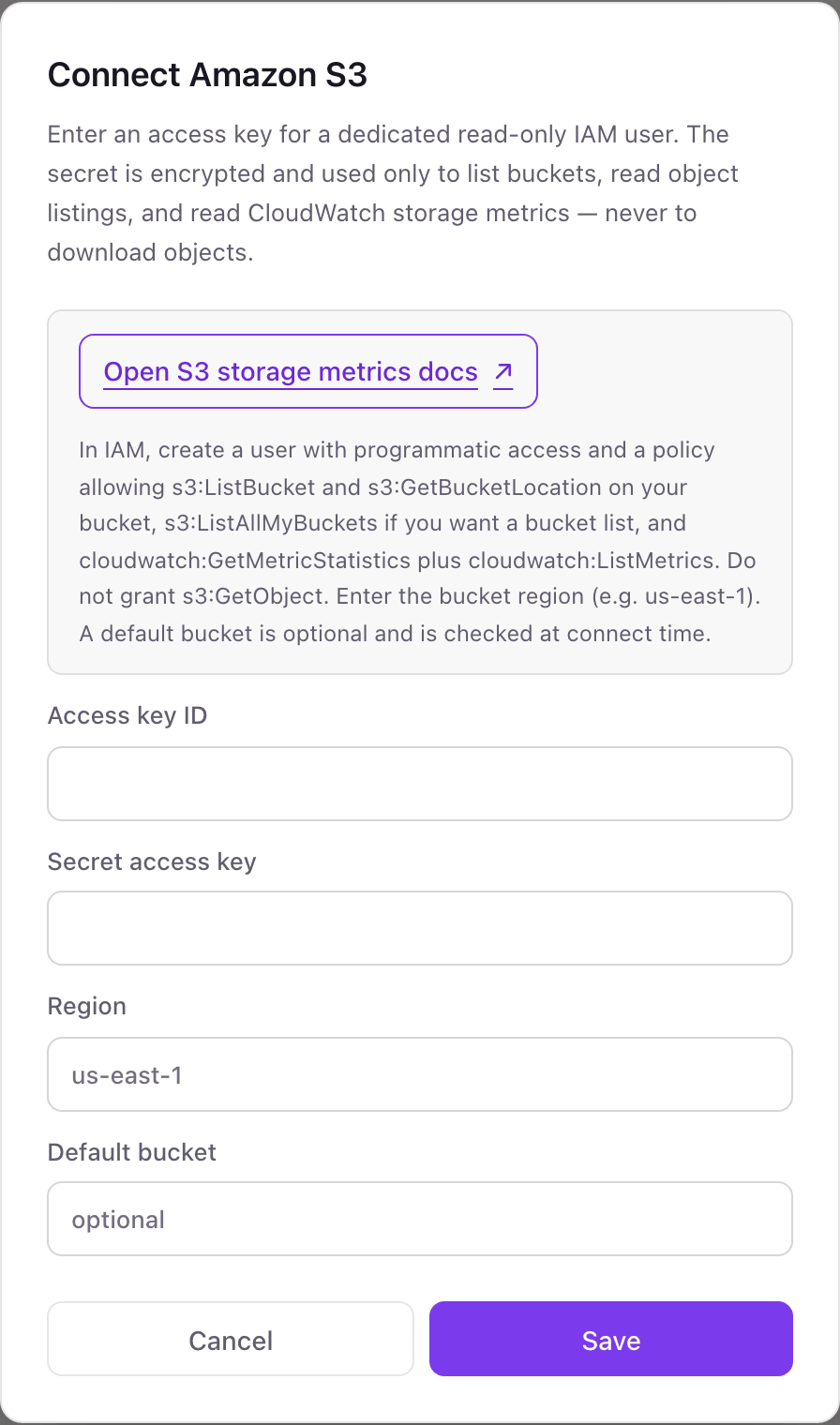
- A policy allowing s3:ListBucket and s3:GetBucketLocation on your bucket, s3:ListAllMyBuckets for a bucket list, and cloudwatch:GetMetricStatistics plus cloudwatch:ListMetrics. Do not grant s3:GetObject.
- The AWS Region your bucket lives in, such as us-east-1
- 1In the AWS IAM console, create a user for Dance Party with no console access.Open IAM users ↗
- 2Attach a policy with s3:ListBucket and s3:GetBucketLocation on the bucket, s3:ListAllMyBuckets if you want a bucket list, and cloudwatch:GetMetricStatistics and cloudwatch:ListMetrics. Leave s3:GetObject out.
- 3On the user's Security credentials tab, create an access key and copy the Access key ID and Secret access key.
- 4In Dance Party, open Integrations, click Connect Amazon S3, and fill in Access key ID, Secret access key, and Region. Default bucket is optional.
- 5Click Save. If you named a Default bucket, Dance Party checks it and corrects the Region if S3 reports a different one. The card then shows Connected.
One Amazon S3 connection per workspace
A workspace connects one AWS access key and one Region. The key can cover several buckets in that Region, and you can name one as the default. Buckets in another Region, or in a second AWS account, need their own Dance Party workspace.
Read-only, and the policy is what guarantees it: without s3:GetObject, the key cannot open a single file, and with no write actions it cannot change anything. The secret is stored encrypted. To revoke access, deactivate or delete the access key on the IAM user's Security credentials tab.
From Amazon S3 to your office display
Once Amazon S3 shows Connected, the rest happens in plain English. No code, no drag-and-drop.
1. Describe it. Tell DJ Agent what you want to see.
New dashboard+ WidgetDescribe a widget in DJ Agent, or click + WidgetDJ AgentDATA SOURCESAmazon S3ConnectedShow bytes stored per storage class for our prod-data-lake S3 bucket as columns, with the total across classes as the headline.Send2. It gets built. The widget lands on your board with real Amazon S3 data.
New dashboard+ Widgetprod-data-lake by storage classLive46.9 TBas of yesterdayStandardStandard-IAInt-Tiering FAInt-Tiering IAGlacier IRDeep ArchiveDJ AgentDATA SOURCESAmazon S3ConnectedShow bytes stored per storage class for our prod-data-lake S3 bucket as columns, with the total across classes as the headline.Send3. Put it on a screen. Pair an Apple TV with the six-character code it shows, then assign the dashboard.

Amazon S3 dashboard questions
Can I show Amazon S3 bucket size on a TV dashboard?
Yes. Dance Party reads the bucket size and object count S3 publishes to CloudWatch and shows them on an Apple TV screen, labeled as of yesterday.
Why is the S3 storage size a day old?
Because S3 publishes its storage metrics to CloudWatch once a day. Dance Party uses those daily figures instead of counting objects itself, so the number is always as of the last daily datapoint.
Can Dance Party open or download my S3 files?
No. The policy it asks for leaves out s3:GetObject. It reads file names, sizes, dates, and storage classes, never the contents.
Does the newest-files list cover the whole bucket?
Not always. S3 lists keys in alphabetical order, and Dance Party sorts the first 1,000 by date. Under a prefix with fewer than 1,000 files, such as one night's export folder, the list is complete.
Can it show object counts per storage class?
No. CloudWatch publishes object counts only for the bucket as a whole. Bytes stored are available per storage class.
Does it show S3 request metrics or Storage Lens data?
No. It reads the free daily storage metrics and object listings only, not request metrics, 4xx and 5xx error rates, or S3 Storage Lens dashboards.
A new bucket shows no size. Is the connection broken?
Probably not. CloudWatch has no storage datapoint for a bucket until about a day after its first object, and the widget says so until one exists.
More integrations
Put Amazon S3 on every office display
Connect Amazon S3, describe the dashboard, and it runs on an Apple TV, refreshing on its own.
Get Started