
Klaviyo revenue dashboards for an Apple TV in the office
Klaviyo splits your email and SMS revenue two ways: campaigns you send and flows that run on their own. Dance Party puts both on an office display, with open and click rates, the Placed Order trend and new subscribers, as a Klaviyo dashboard on Apple TV that the e-commerce team can see from anywhere in the room.
- Read-only
- API key connection
- One connection per workspace
Popular Klaviyo dashboards
What teams running Klaviyo put on the screen, and what you would ask DJ Agent to get it.
Klaviyo flows versus campaigns
For the e-commerce and retention team
In most Klaviyo accounts the welcome, abandoned cart and browse abandonment flows earn as much as the campaign calendar. Showing both attributed totals side by side keeps the team from judging email only by the last blast.
- Revenue attributed to flows over the last 30 days
- Revenue attributed to campaigns over the same window
- Recipients, open rate and click rate for each
Ask DJ Agent“Show Klaviyo attributed revenue from flows and from campaigns for the last 30 days, with recipients, open rate and click rate for each.”
Klaviyo campaign revenue ranking
For email marketers
Open rate says a subject line worked. Placed Order revenue says the campaign worked. Ranking the month's campaigns by attributed revenue shows which themes to repeat.
- Attributed Placed Order revenue per campaign
- Open rate and click rate per campaign
- Recipients per campaign
Ask DJ Agent“Rank our Klaviyo email campaigns from the last 30 days by attributed revenue, with open rate and click rate for each.”
Placed Order revenue trend
For founders and the whole store team
Placed Order is the event Klaviyo counts revenue from. A 30-day line of its daily value shows the effect of each send and each slow day, which is the story the store team wants on the wall.
- Placed Order revenue per day for the last 30 days
- Placed Order count per day
- Change against the previous 30 days
Ask DJ Agent“Chart Klaviyo Placed Order revenue by day for the last 30 days and show the total and the change from the 30 days before.”
Klaviyo Subscribed to List by week
For growth and acquisition marketing
Every sign-up form and pop-up in Klaviyo fires a Subscribed to List event. Counting those by week shows whether the list is growing fast enough to feed next quarter's revenue.
- Subscribed to List events per week
- Current profile count for each list
- The newest week against the average
Ask DJ Agent“Show Klaviyo Subscribed to List events per week for the last 8 weeks, and the current size of our Newsletter list.”
What Dance Party reads from Klaviyo
Dance Party reads Klaviyo's API with a Read-only private key. Revenue comes from Klaviyo's own reporting, measured against your Placed Order metric. Klaviyo caps campaign and flow reports per day, so revenue widgets refresh hourly or slower.
Campaigns
Klaviyo API docs ↗- Campaign listEmail or SMS campaigns with name, status and send time.
- Campaign performanceRecipients, open rate, click rate and attributed revenue per campaign, up to 90 days back.
Flows
Klaviyo API docs ↗- Flow performanceRecipients, open rate, click rate and attributed revenue per flow, reported by flow ID.
Metrics
Klaviyo API docs ↗- Metric trendsCount and value of any metric, such as Placed Order or Subscribed to List, by day, week or month.
- Metric catalogueThe metrics your account tracks, including those from Shopify and other store integrations.
Lists
Klaviyo API docs ↗- List sizesEach list's name and current profile count.
How to connect Klaviyo
Before you start
- An owner or admin of your Dance Party workspace makes the Klaviyo connection.
- An Owner or Admin in Klaviyo, the roles Klaviyo lets create private API keys
- A private key with the Read-only access level (it starts with pk_)
- 1In Klaviyo, open Settings, then Account, then API Keys, and click Create Private API Key.Open Klaviyo API keys ↗
- 2Name it Dance Party, choose the Read-only access level, create it and copy the pk_ key.
- 3In Dance Party, open Integrations, click Connect Klaviyo, and paste the key into Private API key.
- 4Click Save. Dance Party reads your metric list from Klaviyo to confirm the key, and the card shows Connected.
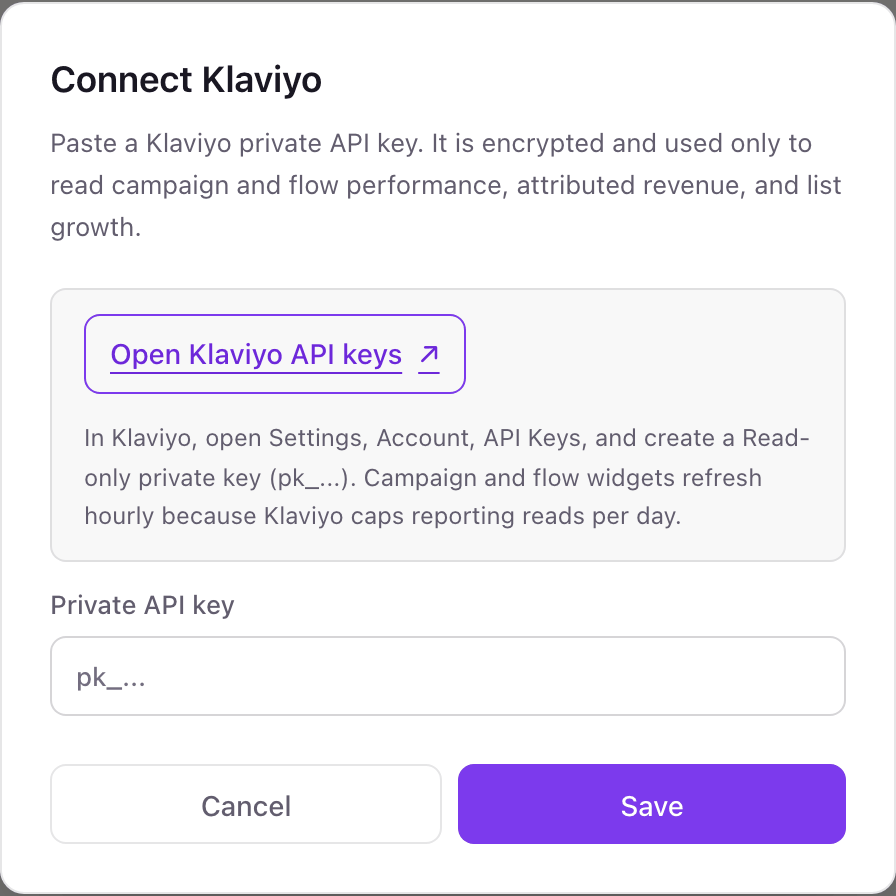
One Klaviyo connection per workspace
A Klaviyo private key belongs to one Klaviyo account, so a workspace shows one store's email and SMS. A brand running separate Klaviyo accounts per store or region connects each in its own Dance Party workspace.
With the Read-only access level, Klaviyo itself refuses any change the key tries to make. Revoke it from Settings, Account, API Keys and Dance Party stops reading.
From Klaviyo to your office display
Once Klaviyo shows Connected, the rest happens in plain English. No code, no drag-and-drop.
1. Describe it. Tell DJ Agent what you want to see.
New dashboard+ WidgetDescribe a widget in DJ Agent, or click + WidgetDJ AgentDATA SOURCESKlaviyoConnectedShow Klaviyo attributed revenue from flows and from campaigns for the last 30 days, with recipients, open rate and click rate for each.Send2. It gets built. The widget lands on your board with real Klaviyo data.
New dashboard+ WidgetEmail revenue split, 30 daysLiveFlows$71,56059% of totalCampaigns$48,21041% of totalFlow click rate3.9%Campaign click rate1.6%DJ AgentDATA SOURCESKlaviyoConnectedShow Klaviyo attributed revenue from flows and from campaigns for the last 30 days, with recipients, open rate and click rate for each.Send3. Put it on a screen. Pair an Apple TV with the six-character code it shows, then assign the dashboard.

Klaviyo dashboard questions
Can I show Klaviyo email revenue on a TV?
Yes. Connect Klaviyo with a Read-only private key, describe the dashboard, and assign it to an Apple TV running Dance Party.
Why do Klaviyo revenue widgets refresh hourly?
Klaviyo caps campaign and flow reports at 225 requests a day for the whole account. Hourly or slower keeps your dashboards inside that cap.
Which Klaviyo key type do I need?
A private API key with the Read-only access level. Public keys (site IDs) and Full Access keys are not needed.
Does the revenue match Klaviyo's own dashboard?
It comes from the same attribution. Dance Party asks Klaviyo's reporting API for conversion value against your Placed Order metric, the same revenue Klaviyo attributes.
Can it rank my Klaviyo flows by name?
Not yet. Flow results come back by flow ID, so boards show total flow revenue and rates rather than a named list of flows.
Does it include SMS campaigns?
Yes. Dance Party lists SMS campaigns as well as email, and campaign performance covers both channels.
Can Dance Party send a Klaviyo campaign or edit a flow?
No. A Read-only key cannot create, send or change anything, and Dance Party only asks Klaviyo for reports.
More integrations
Put Klaviyo on every office display
Connect Klaviyo, describe the dashboard, and it runs on an Apple TV, refreshing on its own.
Get Started