
PagerDuty on-call and incidents as an Apple TV dashboard
PagerDuty decides who gets woken up, but the rest of the office rarely knows who that is. Dance Party puts the on-call engineer for each escalation policy, open incidents by urgency, and every service's status on an office display, as a PagerDuty dashboard running on Apple TV.
- Read-only
- API key connection
- One connection per workspace
Popular PagerDuty dashboards
What teams running PagerDuty put on the screen, and what you would ask DJ Agent to get it.
Who has the pager
For engineering, support, and customer success
Support should not have to open PagerDuty to learn who to ping about a customer escalation. The screen lists the current on-call for each escalation policy and level, with when the shift hands over.
- Who is on call now for each escalation policy
- Escalation level of each on-call responder
- Schedule name and when the current shift ends
Ask DJ Agent“Show who is on call right now in PagerDuty for each escalation policy, level 1 first, with when their shift ends.”
Open incident board
For on-call responders and incident commanders
A triggered incident nobody has acknowledged is the one that escalates to the next level. Sorting open incidents by status and urgency puts it at the top, where the whole room can see it.
- Triggered and acknowledged incidents
- High-urgency and low-urgency incidents
- Title, service, and open time of each incident
Ask DJ Agent“List open PagerDuty incidents, triggered before acknowledged, with urgency, service, and how long each has been open.”
Service status wall
For SRE and platform teams
PagerDuty rolls each service up to active, warning, or critical from its open incidents. One tile per service turns that into a map of what is hurting right now.
- Status of each service: active, warning, critical, maintenance, or disabled
- Services in warning or critical because of open incidents
- Number of services in each status
Ask DJ Agent“Show a tile for each PagerDuty service colored by its current status, critical services first.”
Incidents per day, last 7 days
For engineering managers
A week of incident counts shows whether on-call is getting quieter or louder. A spike on the day of a big release is worth a line in the retro before anyone forgets it.
- Incidents opened each day, from up to 100 recent incidents
- High-urgency share of each day's incidents
- The service that opened the most incidents
Ask DJ Agent“Chart PagerDuty incidents opened per day over the last 7 days, and name the service with the most incidents.”
What Dance Party reads from PagerDuty
Dance Party reads PagerDuty through the REST API with a read-only API key, on the US or EU host you pick. It reads one page of up to 100 records per request and never acknowledges, resolves, or reassigns anything.
Incidents
PagerDuty API docs ↗- IncidentsTitle, status, urgency, service, and created time, filtered by status, urgency, or date range.
On-call
PagerDuty API docs ↗- Who is on callThe responder on call now for each escalation policy and level, with shift start and end.
- SchedulesSchedule names and their time zones.
Services
PagerDuty API docs ↗- Service statusEach service's name and whether it is active, warning, critical, in maintenance, or disabled.
How to connect PagerDuty
Before you start
- An owner or admin of your Dance Party workspace makes the PagerDuty connection.
- A PagerDuty Admin or Account Owner, the roles that can create a general access REST API key
- The key created with Read-only API Key checked
- Your PagerDuty region: United States, or European Union for EU-hosted accounts
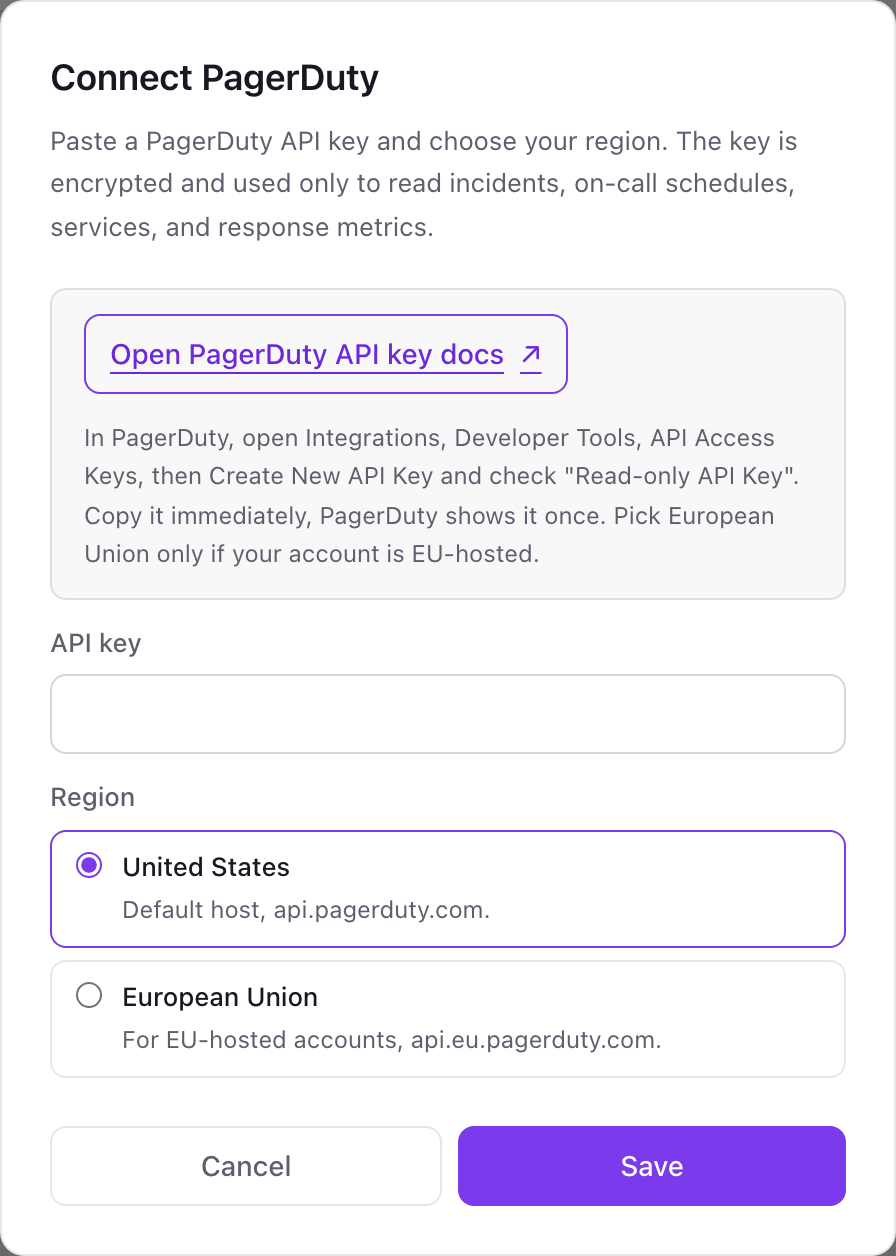
- 1Go to Integrations in Dance Party and press Connect PagerDuty. The pop-up wants an API key and a region.
- 2In PagerDuty, open Integrations, then Developer Tools, then API Access Keys, and click Create New API Key.PagerDuty API access keys guide ↗
- 3Give it a description such as Dance Party office display, check Read-only API Key, and create it. Copy the key now, because PagerDuty shows it once.
- 4Paste it into API key. Leave Region on United States unless your PagerDuty address ends in eu.pagerduty.com, then pick European Union.
- 5Click Save. Dance Party reads one service to check the key, and the card shows Connected.
One PagerDuty connection per workspace
A workspace connects one PagerDuty account in one region. If your company has a separate PagerDuty account, for example an EU-hosted one, it needs its own Dance Party workspace.
Read-only. A key created with Read-only API Key checked can only make GET requests, so it cannot acknowledge, resolve, snooze, or reassign an incident. Disable or delete the key under API Access Keys to cut access.
From PagerDuty to your office display
Once PagerDuty shows Connected, the rest happens in plain English. No code, no drag-and-drop.
1. Describe it. Tell DJ Agent what you want to see.
New dashboard+ WidgetDescribe a widget in DJ Agent, or click + WidgetDJ AgentDATA SOURCESPagerDutyConnectedShow who is on call right now in PagerDuty for each escalation policy, level 1 first, with when their shift ends.Send2. It gets built. The widget lands on your board with real PagerDuty data.
New dashboard+ WidgetOn call nowLiveuntil Mon 9 a.m.Maya ChenPlatform, level 1until Mon 9 a.m.Luis OrtegaPlatform, level 2until 6 p.m.Aisha BelloPayments, level 1until Fri 5 p.m.Ben KowalskiMobile, level 1DJ AgentDATA SOURCESPagerDutyConnectedShow who is on call right now in PagerDuty for each escalation policy, level 1 first, with when their shift ends.Send3. Put it on a screen. Pair an Apple TV with the six-character code it shows, then assign the dashboard.

PagerDuty dashboard questions
Can I show PagerDuty on-call on an Apple TV?
Yes. Connect PagerDuty with a read-only API key, ask DJ Agent for a who-is-on-call board, and assign it to a screen running the Dance Party Apple TV app.
Can the dashboard show MTTA and MTTR?
Not with a read-only key. PagerDuty serves mean time to acknowledge and resolve through an analytics endpoint that takes a POST, and read-only keys are limited to GET, so that tile shows as unavailable.
Which PagerDuty role do I need to create the API key?
Admin or Account Owner. Those are the roles PagerDuty lets create general access REST API keys under API Access Keys.
Why is my PagerDuty key rejected?
Usually the region. An EU-hosted account only answers on the EU host, so pick European Union if your PagerDuty address ends in eu.pagerduty.com.
Can Dance Party acknowledge or resolve PagerDuty incidents?
No. The key is read-only and Dance Party only reads incidents, on-calls, services, and schedules. Responding stays in PagerDuty.
Does the incident board count every incident in the account?
No. Each read returns one page of up to 100 incidents, which covers what an office display needs: what is open now and the last several days.
How often does a PagerDuty widget refresh?
As often as every 5 minutes. PagerDuty allows 960 requests a minute per key, so an office display with several widgets stays far inside it.
More integrations
Put PagerDuty on every office display
Connect PagerDuty, describe the dashboard, and it runs on an Apple TV, refreshing on its own.
Get Started