
Opsgenie alerts and on-call on an Apple TV dashboard
Opsgenie routes every alert to a schedule and a person, with priorities from P1 down to P5. Dance Party shows the open ones on an office display: the P1 nobody has acknowledged, the count by priority, and who is on call for each schedule, as an Opsgenie dashboard on Apple TV.
- Read-only
- API key connection
- One connection per workspace
Opsgenie dashboard examples
What teams running Opsgenie put on the screen, and what you would ask DJ Agent to get it.
Open alert queue
For on-call responders and the NOC
An open P1 that nobody has acknowledged is the alert Opsgenie is about to escalate to the next person. Splitting open alerts into acknowledged and not puts that number where the whole room sees it.
- Open alerts, acknowledged and not acknowledged
- Open P1 and P2 alerts
- Snoozed alerts
- Message, age, and responding team of each open alert
Ask DJ Agent“Show our open Opsgenie alerts split into acknowledged and not acknowledged, with open P1s and snoozed alerts counted separately.”
On call now, per schedule
For support, engineering, and anyone who needs to escalate
Opsgenie schedules stack rotations, overrides, and time zones. The schedule timeline resolves all of that into one answer per schedule: who has it right now, and until when.
- The schedules in your Opsgenie account
- Who is on call now for each schedule you name, overrides included
- When the current on-call period ends
Ask DJ Agent“Show who is on call right now for our Opsgenie Platform, Payments, Mobile, and Data schedules, with when each shift ends.”
Noisiest open alerts
For SRE leads cleaning up alert fatigue
Opsgenie folds a repeating alert into one alert with a count. Ranking open alerts by that count finds the flapping check that keeps paging people for the same thing.
- Open alerts ranked by how many times they repeated
- The source integration of each alert
- When each one last fired
Ask DJ Agent“Rank open Opsgenie alerts by repeat count, with the source and when each one last fired.”
What Dance Party reads from Opsgenie
Dance Party reads open alerts and on-call schedules through the Opsgenie REST API with a GenieKey, on the US or EU host you pick. It reads up to 100 open alerts per refresh and never acknowledges, closes, or snoozes anything.
Alerts
Opsgenie API docs ↗- Open alertsMessage, priority P1 to P5, acknowledged and snoozed state, and repeat count.
- Alert timing and originWhen each alert was created and last occurred, its source, tags, and responders.
On-call schedules
Opsgenie API docs ↗- SchedulesEvery schedule in the account, with its id and owning team.
- Schedule timelineWho is on call for one schedule and until when, with rotations and overrides applied.
How to connect Opsgenie
Before you start
- An owner or admin of your Dance Party workspace makes the Opsgenie connection.
- An Opsgenie account owner or global admin, the roles that can open API key management
- An API key with Read and Configuration access checked, and Create and update and Delete left unchecked. Configuration access is what lets the key read schedules.
- Your Opsgenie region: United States, or European Union if you sign in at app.eu.opsgenie.com
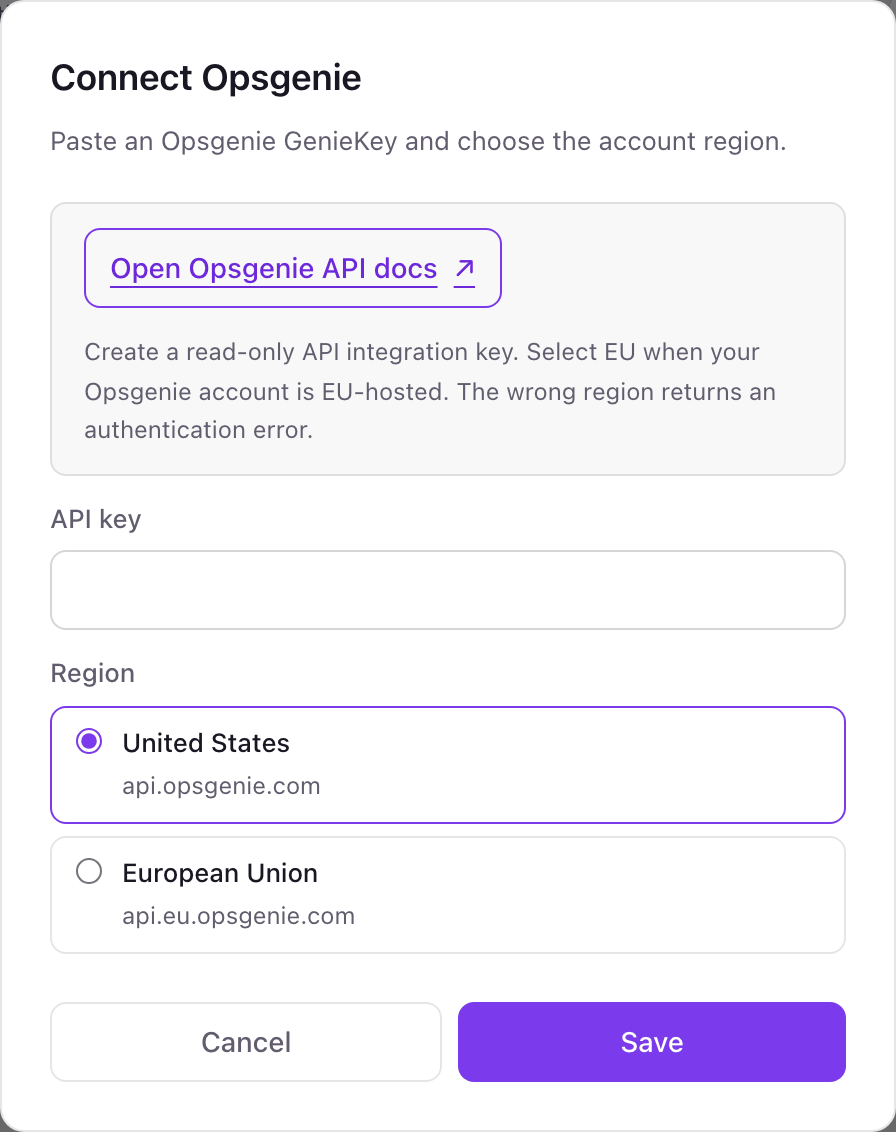
- 1Find the Opsgenie card on Dance Party's Integrations page and click Connect Opsgenie.
- 2In Opsgenie, open Settings, then API key management, and add a new API key named Dance Party.Opsgenie API key management guide ↗
- 3Tick Read and Configuration access only, save the key, and copy it.
- 4Paste it into API key and pick your Region. Choose European Union if you sign in at app.eu.opsgenie.com, because the wrong region fails exactly like a bad key.
- 5Click Save. Dance Party lists your schedules to check the key, and the card shows Connected.
One Opsgenie connection per workspace
One Opsgenie account, on the US or the EU host, per Dance Party workspace. The key from API key management covers every team and schedule in that account, so one connection feeds every on-call board.
Read-only when Create and update and Delete stay unchecked. Dance Party only sends GET requests for open alerts, schedules, and schedule timelines. Delete the key under API key management to cut access.
From Opsgenie to your office display
Once Opsgenie shows Connected, the rest happens in plain English. No code, no drag-and-drop.
1. Describe it. Tell DJ Agent what you want to see.
New dashboard+ WidgetDescribe a widget in DJ Agent, or click + WidgetDJ AgentDATA SOURCESOpsgenieConnectedShow our open Opsgenie alerts split into acknowledged and not acknowledged, with open P1s and snoozed alerts counted separately.Send2. It gets built. The widget lands on your board with real Opsgenie data.
New dashboard+ WidgetOpen alertsLive4Not acknowledged19Acknowledged2Open P11SnoozedDJ AgentDATA SOURCESOpsgenieConnectedShow our open Opsgenie alerts split into acknowledged and not acknowledged, with open P1s and snoozed alerts counted separately.Send3. Put it on a screen. Pair an Apple TV with the six-character code it shows, then assign the dashboard.

Opsgenie dashboard questions
Can I put Opsgenie alerts on an Apple TV?
Yes. Connect Opsgenie with an API key, describe the alert or on-call board to DJ Agent, and assign it to a screen running the Dance Party Apple TV app.
Opsgenie is being retired. Is this worth setting up?
Yes, for as long as you run it. Atlassian stopped selling Opsgenie on June 4, 2025 and ends support on April 5, 2027, when its REST API stops working. If you move on-call to PagerDuty, Dance Party connects to that too.
Why does the Opsgenie key need Configuration access?
Because Opsgenie treats schedules as configuration. Without it the key can read alerts, but reading schedules fails, and that is the check Dance Party runs when you connect.
Can I use a team's API integration key instead?
It is not the right key. Team integration keys are limited to that team's alerts and configuration, so account-level schedule reads fail. Create the key under API key management.
Why is my Opsgenie key rejected?
Usually the region. An EU account queried on the US host returns an auth error that looks exactly like a bad key, so pick European Union if you sign in at app.eu.opsgenie.com.
Can Dance Party acknowledge or close Opsgenie alerts?
No. It only reads open alerts and schedules. Acknowledging, closing, snoozing, and overrides stay in Opsgenie.
More integrations
Put Opsgenie on every office display
Connect Opsgenie, describe the dashboard, and it runs on an Apple TV, refreshing on its own.
Get Started