
Tailscale tailnet health on an Apple TV dashboard for IT
Tailscale node keys expire every 180 days by default, so every tailnet has a steady trickle of machines that need re-authenticating. Dance Party puts that list on an office display with devices online, approvals waiting, and clients behind on updates, as a Tailscale dashboard running on Apple TV.
- Read-only
- API key connection
- One connection per workspace
Tailscale dashboard examples
What teams running Tailscale put on the screen, and what you would ask DJ Agent to get it.
Needs-attention board
For IT and the tailnet admins
Device approval, client updates, and key expiry each sit behind a different filter on the Machines page. One screen with all three counts turns tailnet upkeep into something the team sees on the way past.
- Devices waiting for approval
- Devices with a Tailscale client update available
- Node keys expiring in the next 14 days, and any already expired
- External devices shared in from other tailnets
Ask DJ Agent“Show a Tailscale needs-attention board: devices waiting for approval, devices with an update available, and node keys expiring in the next 14 days.”
Key expiry countdown
For infrastructure engineers
A server whose node key expires drops off the tailnet until someone re-authenticates it. The next expiries, soonest first with hostname and OS, give the team days of warning on the machines that matter.
- Devices whose node key expires within a window you pick, up to 90 days
- Hostname and operating system of each one
- When each key expires, and whether it already has
- Whether that device is online now
Ask DJ Agent“List Tailscale devices whose node keys expire in the next 30 days, soonest first, with hostname, OS, and days left.”
Devices by operating system
For IT operations
Knowing that 61 of 168 machines on the tailnet are Macs and 18 are Windows tells IT where the next round of client updates lands. Each bar comes with how many of that OS are online now.
- Device count per operating system
- Online devices per operating system
- Total devices on the tailnet
Ask DJ Agent“Chart our Tailscale devices by operating system as columns, with how many of each are online.”
Tailnet users and roles
For security and IT leads
Admin rights on a tailnet should stay with a handful of people. Users by role, next to how many are connected right now, makes a creeping admin count visible long before an access review.
- Users by role, such as owner, admin, IT admin, and member
- Users by status, such as active, idle, or suspended
- Users connected right now
- Devices across all users
Ask DJ Agent“Show our Tailscale users by role and by status, with how many are connected right now.”
What Dance Party reads from Tailscale
Dance Party reads two lists from your tailnet, devices and users, through an OAuth client with read-only scopes. It drops Tailscale IP addresses, machine and node keys, owner logins, and email addresses before anything reaches a screen.
Devices
Tailscale API docs ↗- Device summaryTotal, online, offline, awaiting approval, updates available, keys expiring within 14 days, and external devices.
- Device listHostname, OS, client version, online state, last seen, approval, update status, key expiry, and tags.
- OS breakdownDevices per operating system, with the online count for each.
- Expiring keysDevices whose node key expires within a window up to 90 days, soonest first. Devices with key expiry disabled are left out.
Users
Tailscale API docs ↗- Users summaryTotal users, users connected now, counts by role and by status, and devices across all users.
- User listDisplay name, role, status, device count, last seen, and whether each user is connected. No login emails.
How to connect Tailscale
Before you start
- An owner or admin of your Dance Party workspace makes the Tailscale connection.
- An Owner, Admin, Network admin, or IT admin role in Tailscale, which is what creating an OAuth client takes
- An OAuth client with two scopes, both Read only: Devices: Core and Users
- Your tailnet name, only if the OAuth client belongs to a different tailnet than the one you want on screen
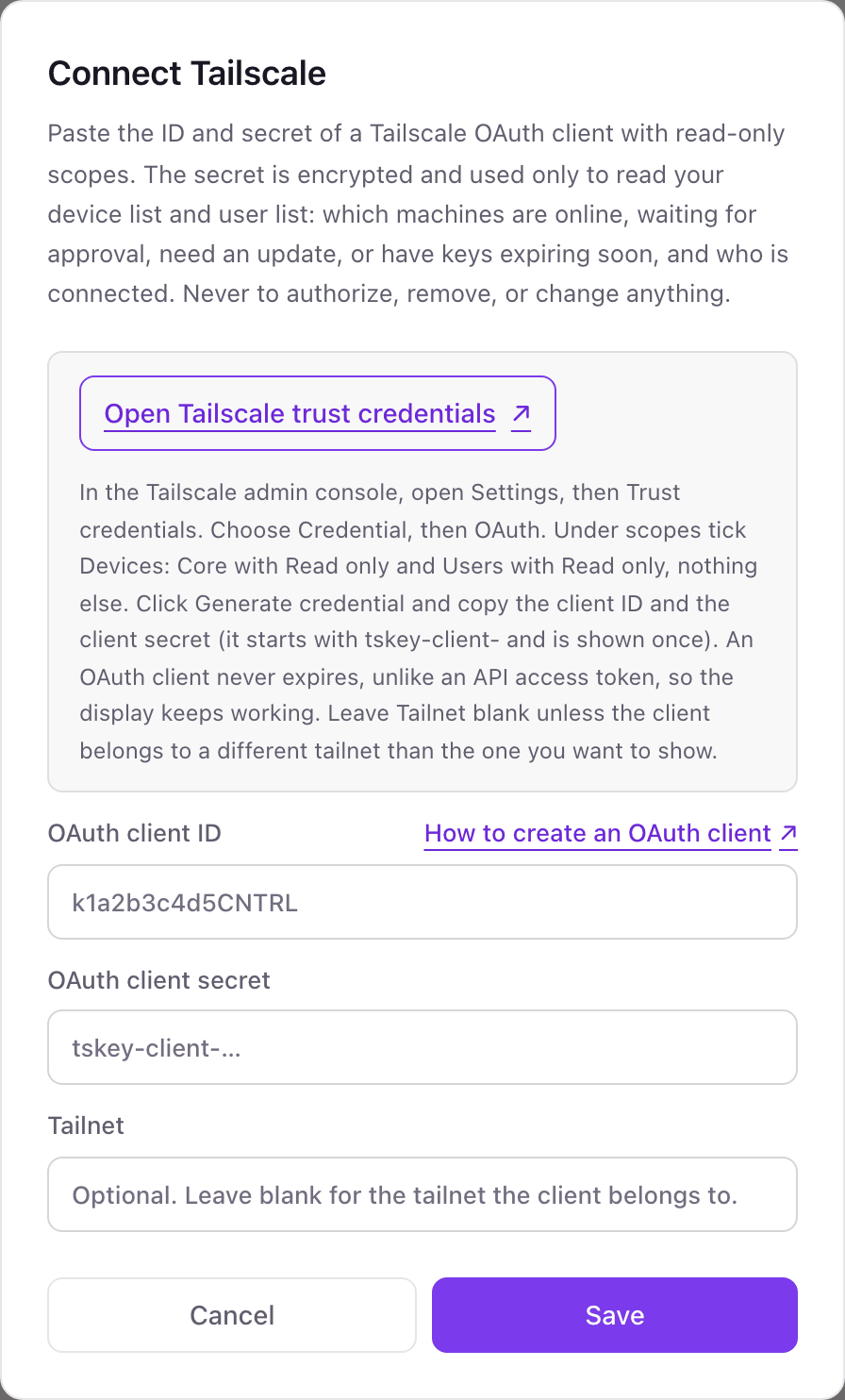
- 1Click Connect Tailscale on the Integrations page in Dance Party to open the pop-up.
- 2In the Tailscale admin console, open Settings, then Trust credentials, and choose Credential, then OAuth.Open Tailscale trust credentials ↗
- 3Under scopes, tick Devices: Core with Read only and Users with Read only, nothing else, and click Generate credential.
- 4Paste the client ID into OAuth client ID and the secret, which starts with tskey-client-, into OAuth client secret. Tailscale shows the secret once.
- 5Leave Tailnet blank unless the client belongs to another tailnet, then click Save. The card shows Connected once Dance Party reads your device list.
One Tailscale connection per workspace
A workspace connects one tailnet. If you keep a separate tailnet for production servers or for a client, that second tailnet needs its own Dance Party workspace.
Read-only. The OAuth client can only read devices and users, so it cannot approve a machine, expire a key, remove a device, or touch your access controls. Revoke the client on Tailscale's Trust credentials page to cut access.
From Tailscale to your office display
Once Tailscale shows Connected, the rest happens in plain English. No code, no drag-and-drop.
1. Describe it. Tell DJ Agent what you want to see.
New dashboard+ WidgetDescribe a widget in DJ Agent, or click + WidgetDJ AgentDATA SOURCESTailscaleConnectedShow a Tailscale needs-attention board: devices waiting for approval, devices with an update available, and node keys expiring in the next 14 days.Send2. It gets built. The widget lands on your board with real Tailscale data.
New dashboard+ WidgetNeeds attentionLivePending approval3 devicesUpdate available27 devicesKey expiring, 14 days5 devicesKey expired1 deviceDJ AgentDATA SOURCESTailscaleConnectedShow a Tailscale needs-attention board: devices waiting for approval, devices with an update available, and node keys expiring in the next 14 days.Send3. Put it on a screen. Pair an Apple TV with the six-character code it shows, then assign the dashboard.

Tailscale dashboard questions
Can I show Tailscale device status on an Apple TV?
Yes. Connect Tailscale with a read-only OAuth client, describe the board to DJ Agent, and assign it to a screen running the Dance Party Apple TV app.
Why an OAuth client instead of a Tailscale API access token?
Because OAuth clients do not expire. A Tailscale API access token lasts 90 days at most, so a display built on one would stop refreshing when it ran out.
Which Tailscale OAuth scopes does Dance Party need?
Two, both set to Read only: Devices: Core and Users. Nothing else is needed, and nothing broader should be ticked.
Does the dashboard show Tailscale IP addresses or emails?
No. Dance Party drops IP addresses, machine and node keys, owner logins, and email addresses. Screens get hostnames, display names, roles, and counts.
When does a Tailscale device count as online?
When Tailscale reports it connected to the control server, or it was seen in the last 5 minutes. Everything else counts as offline.
Can Dance Party approve devices or change ACLs in Tailscale?
No. The OAuth client only carries read scopes for devices and users. Approvals, key expiry, tags, and ACLs stay in the Tailscale admin console.
More integrations
Put Tailscale on every office display
Connect Tailscale, describe the dashboard, and it runs on an Apple TV, refreshing on its own.
Get Started