
A Pingdom uptime wall for the office display, as an Apple TV dashboard
Pingdom tests your sites and APIs from probes around the world, every minute or every few. Dance Party turns that check list into an Apple TV dashboard for the office display: a tile per check, green when it is up, red the moment Pingdom confirms it is down.
- Read-only
- API key connection
- One connection per workspace
Pingdom dashboard examples
What teams running Pingdom put on the screen, and what you would ask DJ Agent to get it.
Uptime wall for the on-call pod
For SRE, platform and on-call engineers
Pingdom emails the on-call person. The wall tells everyone else, so nobody opens a duplicate ticket for an API the team is already fixing.
- Status of each check: up, down, unconfirmed down, unknown or paused
- The host each check tests
- Time of the last test on each check
Ask DJ Agent“Show every Pingdom check as a tile with its status, red for down and amber for unconfirmed down or paused.”
Slowest checks right now
For web performance and backend teams
A check can be up and still slow. Ranking by Pingdom's last response time puts a login page drifting from 300 ms to 1.9 s in front of the team before customers start noticing.
- Last response time of each check, in milliseconds
- Checks ranked slowest first
- How often each check runs (its resolution in minutes)
Ask DJ Agent“Rank our Pingdom checks by last response time, slowest first, and show the milliseconds.”
Latest outage per check
For engineering managers and support leads
Support gets asked whether the site was down last night. Pingdom keeps the start and end of each check's most recent downtime, so the answer is on the wall with the exact window.
- Start and end of each check's most recent downtime
- How long that downtime lasted
- Time of the last error Pingdom recorded
Ask DJ Agent“List our Pingdom checks by most recent downtime, with when it started and how long it lasted.”
Check fleet summary
For the whole engineering floor
Four numbers answer the first question anyone asks during an incident: how many of our Pingdom checks are down, and is it one service or all of them.
- Checks up right now
- Checks down or unconfirmed down
- Checks paused
Ask DJ Agent“Give me four Pingdom counts: checks up, checks down, unconfirmed down, and paused.”
What Dance Party reads from Pingdom
Dance Party reads your Pingdom check list through Pingdom's API 3.1 with one GET request, up to 100 checks at a time. It never creates, edits, pauses or deletes a check.
Checks
Pingdom API docs ↗- Check listEach check's name, the host it tests, and its type (HTTP, ping, TCP and the rest).
- StatusUp, down, unconfirmed down, unknown or paused, as Pingdom reports it now.
- Last testResponse time of the last test in milliseconds, and when it ran.
- Last downtimeWhen the most recent downtime started and ended, and the time of the last error.
- ResolutionHow often each check runs, in minutes.
How to connect Pingdom
Before you start
- An owner or admin of your Dance Party workspace makes the Pingdom connection.
- A Pingdom login that can open Settings, then Pingdom API (account owners and admins)
- A Pingdom API token with the Access level set to Read access
- 1In Pingdom, open Settings, then Pingdom API, and click Add API token.Open Pingdom API tokens ↗
- 2Name the token Dance Party, set Access level to Read access, click Generate token, and copy it.
- 3Back in Dance Party, find Pingdom under Integrations and click Connect Pingdom.
- 4Paste the token into the API token field and click Save. The pop-up's Open Pingdom API docs link explains Bearer tokens if you need it.Pingdom API 3.1 docs ↗
- 5Dance Party reads your check list once to test the token, then the card shows Connected.
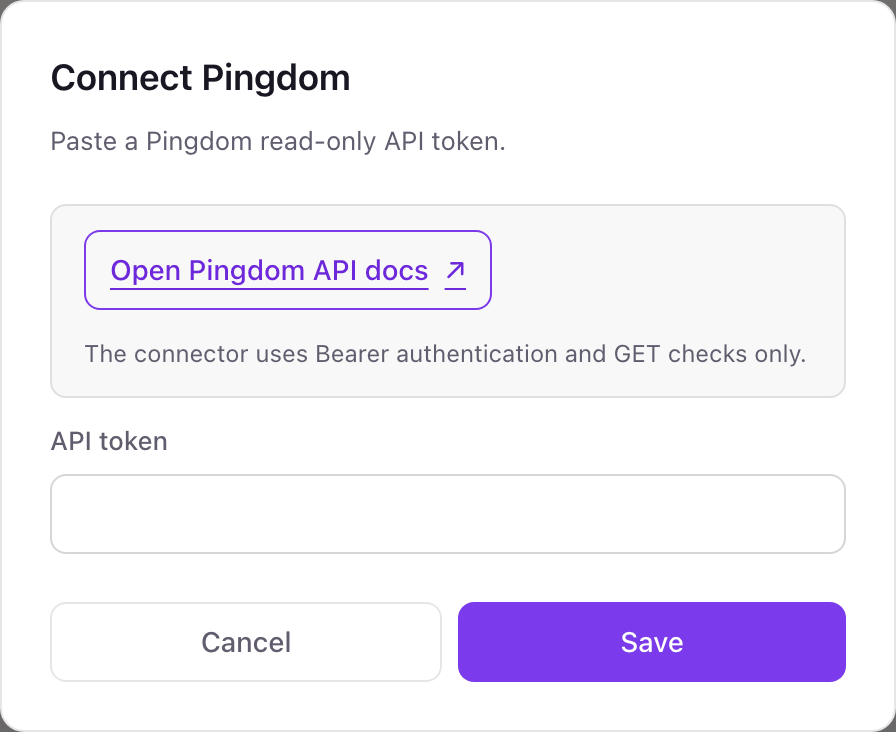
One Pingdom connection per workspace
A workspace connects one Pingdom account, and every uptime widget reads its checks. Pingdom tokens are account-wide, so one token covers every check in that account. A second Pingdom account needs its own Dance Party workspace.
Read-only. A Pingdom token set to Read access cannot create or change checks, and Dance Party only calls the check list. Delete the token under Settings, then Pingdom API, to cut access at any time.
From Pingdom to your office display
Once Pingdom shows Connected, the rest happens in plain English. No code, no drag-and-drop.
1. Describe it. Tell DJ Agent what you want to see.
New dashboard+ WidgetDescribe a widget in DJ Agent, or click + WidgetDJ AgentDATA SOURCESPingdomConnectedShow every Pingdom check as a tile with its status, red for down and amber for unconfirmed down or paused.Send2. It gets built. The widget lands on your board with real Pingdom data.
New dashboard+ WidgetProduction checksLiveMarketing siteUpWeb app loginUpPublic APIDownWebhooks endpointUpDJ AgentDATA SOURCESPingdomConnectedShow every Pingdom check as a tile with its status, red for down and amber for unconfirmed down or paused.Send3. Put it on a screen. Pair an Apple TV with the six-character code it shows, then assign the dashboard.

Pingdom dashboard questions
Can I show Pingdom uptime on an Apple TV?
Yes. Connect Pingdom, ask DJ Agent for a status wall of your checks, and assign it to a screen. The Dance Party Apple TV app shows each check's current state.
Does the Pingdom dashboard show uptime percentages?
No. Dance Party reads Pingdom's check list, which has status, last response time and the last downtime window. Uptime percentages come from Pingdom's summary reports, which it does not read today.
Which Pingdom token access level should I use?
Read access. Pingdom offers Read access and Read/Write tokens, and Dance Party only needs to read the check list.
Are Pingdom transaction checks included?
No. Dance Party reads uptime checks from the checks endpoint. Transaction checks live under Pingdom's separate TMS endpoints, which it does not call.
How fresh is the Pingdom status on the screen?
As fresh as the widget's refresh setting, from every 5 minutes up. Pingdom itself tests each check at its own resolution, often every minute.
Can Dance Party pause or edit a Pingdom check?
No. It only reads the check list. It cannot pause, create, edit or delete checks, alert contacts or integrations.
More integrations
Put Pingdom on every office display
Connect Pingdom, describe the dashboard, and it runs on an Apple TV, refreshing on its own.
Get Started